UNIHUB RUNner を ChatGPT・Claude で使う
UNIHUB RUNner は、UNIHUB の中にゴールを置き、AI が進めて、終わったかどうかを検査で確かめる機能です。 ChatGPT や Claude のコネクタにつなぐと、いつもの会話から RUNner のゴール・メモ・検査を読んだり書いたりできます。 AI の利用料は、ChatGPT・Claude 側のご契約のままです。
使える人
RUNner が使える UNIHUB の組織に入っている人です。使えない組織だけのアカウントでは、許可の画面に「いま RUNner を使えません」と出て、つながりません。RUNner が使える条件は、組織の管理者にご確認ください。
足し方
Claude(claude.ai・デスクトップ)
- 設定 → コネクタ で「UNIHUB RUNner」を探して追加する(一覧に無いときは「カスタムコネクタを追加」で URL に下の MCP の URL を入れる)
- UNIHUB のログイン画面が開くので、ふだんのアカウントでログインする
- 許可の画面で内容を確かめて「許可する」を押す
Claude のコネクタ一覧のページ:https://claude.ai/directory/connectors/unihub
ChatGPT
- プラグイン(アプリ)の一覧で「UNIHUB RUNner」を探して追加する
- UNIHUB のログイン画面が開くので、ふだんのアカウントでログインする
- 許可の画面で内容を確かめて「許可する」を押す
MCP の URL:https://hub.uni-core.jp/api/run/mcp(OAuth でログインします。鍵を貼る必要はありません)
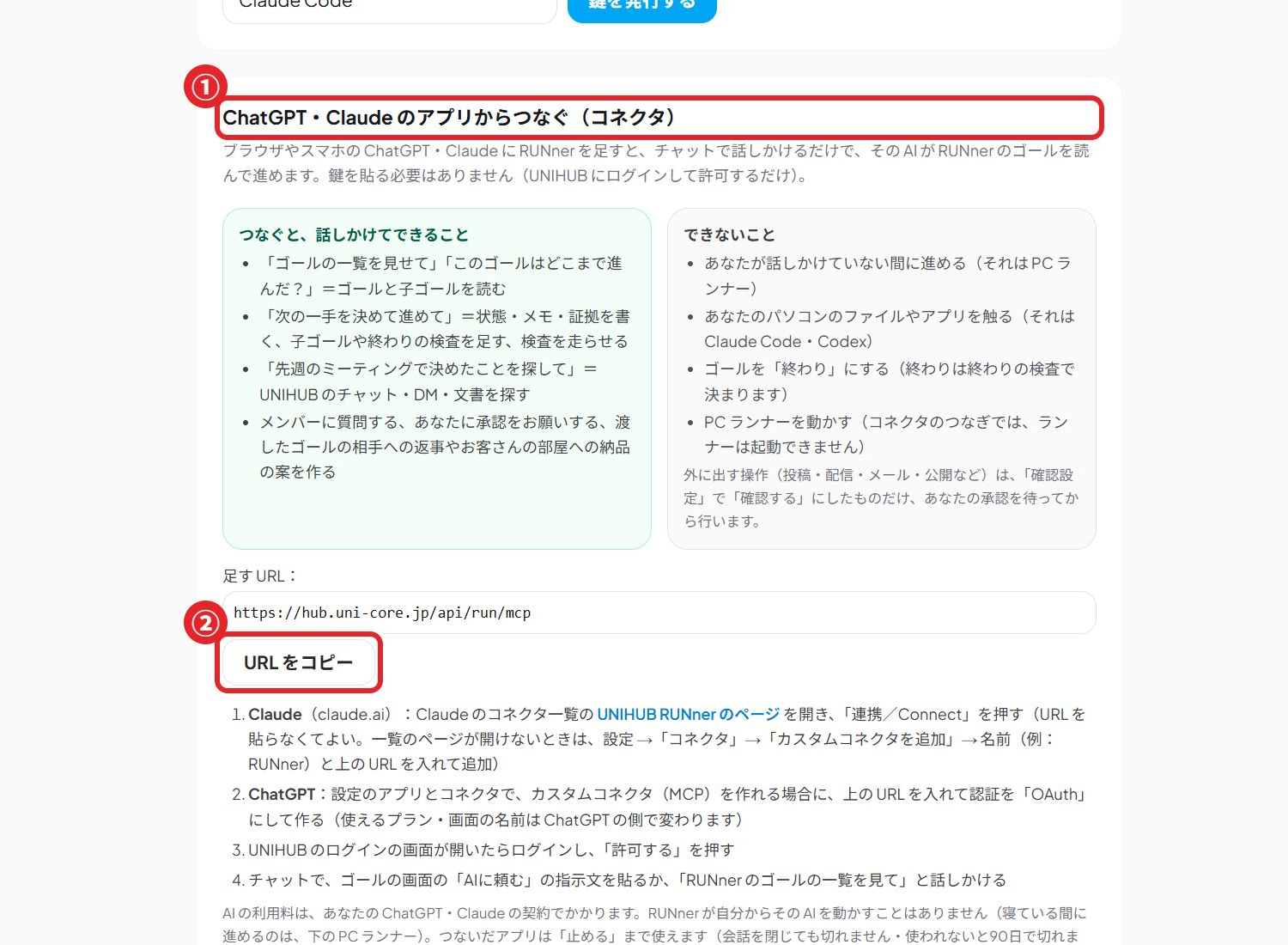
できること
読む
ゴールの一覧・ゴールの文脈(完了の基準・現状・守ること・検査・メモ)・手順書・UNIHUB の中の検索・承認の結果・メンバーの一覧と返事・下書き・ゴール分解
書く(組織の中)
メモ・証拠・検査・子ゴールを足す/現状とメモを書き換える/手順書・返信・ゴール分解の下書きを保存する/承認を依頼する/検査を走らせる
人に届く
メンバーに質問する・手順を渡した相手の DM に答える・お客さんとの外部共有チャットに納品案を出す(組織の確認設定で承認が要るものは、人の承認が済むまで出せません)
- 見られるのは、あなたが UNIHUB で見られるゴール・チャンネルだけです
- ゴールを「終わり」にできるのは、検査がすべて通ったときだけです。AI が自分で終わりにはできません
- ゴールやメッセージを削除する機能はありません
- 進み具合の報告・検査を走らせる・承認の依頼・メンバーへの質問・下書きの保存・納品は、UNIHUB の画面の「AIに頼む」で始めた依頼の続きとして使えます(依頼の指示文に入っている依頼番号が要ります)
話しかけ方の例
- 「RUNner の私のゴールを一覧して」
- 「◯◯のゴールの今の状態と、次にやることを教えて」
- 「このゴールに『LP の初稿を書いた』とメモして」
- 「チャットで『請求書』の話を探して」
止め方
- UNIHUB にログインし、RUNner の「AIをつなぐ」を開く
- 「発行した鍵」の一覧で、止めたい接続(ChatGPT・Claude)の「止める」を押す
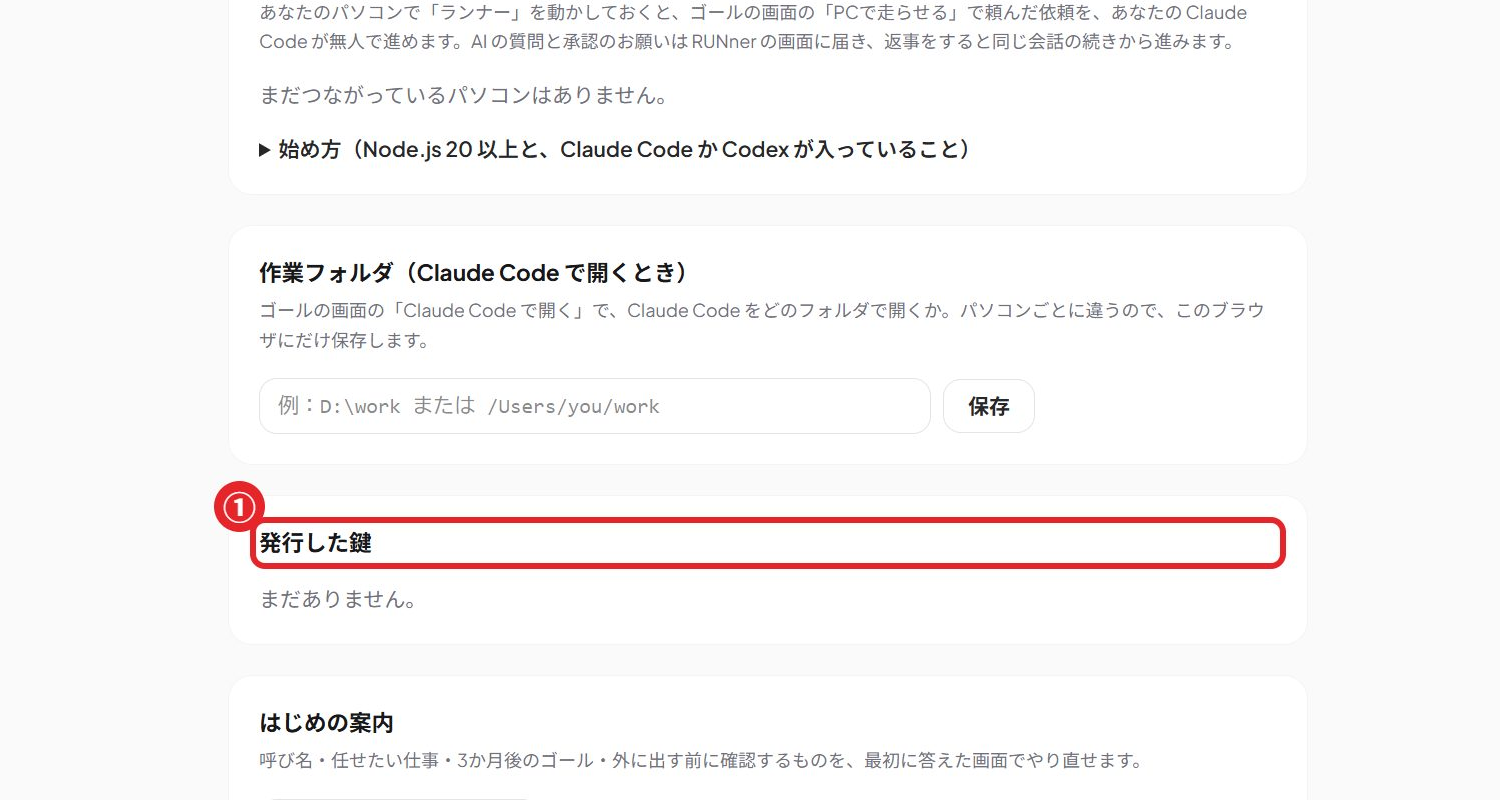
止めた接続はすぐに使えなくなります。ChatGPT・Claude 側でコネクタを外しても、UNIHUB 側の接続は残るので、両方で止めてください。
困ったとき
- 「いま RUNner を使えません」と出る:RUNner が使える組織に入っていません。組織の管理者にご確認ください
- 途中でつながらなくなった:接続を止めたか、90日間使っていません。コネクタからもう一度ログインしてください
- AI が「承認待ち」と言う:組織の確認設定で承認が要る操作です。ゴールの画面で承認するか却下してください
お問い合わせ:support@uni-core.jp(お問い合わせフォーム)/プライバシーポリシー(第4条の4)/利用規約
Use UNIHUB RUNner from ChatGPT and Claude
UNIHUB RUNner lets you place goals in UNIHUB, have AI work on them, and confirm completion with checks. Connect it to ChatGPT or Claude to read and update your RUNner goals, notes and checks from a normal conversation. AI usage stays on your own ChatGPT or Claude plan.
Who can use it
Members of a UNIHUB organization where RUNner is available. Other accounts see "RUNner is not available" on the consent screen and cannot connect. Ask your organization's administrator whether RUNner is available.
Connect
- Add “UNIHUB RUNner” from the connector / plugin directory in Claude or ChatGPT (or add a custom connector with the MCP URL below)
- Sign in to UNIHUB with your usual account
- Review the consent screen and choose “Allow” (許可する)
Claude connector directory: https://claude.ai/directory/connectors/unihub
MCP URL: https://hub.uni-core.jp/api/run/mcp (OAuth sign-in; no key to paste)
What it can do
Read
List goals; goal context (definition of done, current state, rules, checks, notes); templates; search inside UNIHUB; approval results; members and their answers; reply drafts; goal breakdowns
Write (inside your organization)
Add notes, evidence, checks and sub-goals; overwrite a goal's current state and memo; save drafts of templates, replies and goal breakdowns; request approval; run checks
Reaches people
Ask a member a question; reply in a handoff DM; post a delivery proposal to a customer room. Anything your organization's approval rules cover cannot go out until a person approves it
- You only see goals and channels you can already see in UNIHUB
- A goal becomes done only when every check passes; the AI cannot mark it done by itself
- There is no tool that deletes goals or messages
- Reporting progress, running checks, requesting approval, asking members, saving drafts and delivering work continue a request started with “AIに頼む” (Ask AI) on the UNIHUB screen; they need the request id in that request's prompt
Example prompts
- “List my RUNner goals”
- “What is the current state of the ◯◯ goal, and what should happen next?”
- “Add a note to this goal: wrote the first draft of the landing page”
- “Search our chats for invoices”
Disconnect
- Sign in to UNIHUB and open RUNner → “AIをつなぐ” (Connect AI)
- In “発行した鍵” (Issued keys), choose “止める” (Stop) on the ChatGPT or Claude connection
A stopped connection stops working immediately. Removing the connector in ChatGPT or Claude does not stop it on the UNIHUB side, so stop it in both places.
Troubleshooting
- “RUNner is not available”: your account is not in an organization where RUNner is available
- The connection stopped working: it was stopped, or it was not used for 90 days. Sign in again from the connector
- The AI says it is waiting for approval: your organization requires approval for that action. Approve or reject it on the goal screen
Support: support@uni-core.jp · Privacy policy (Article 4-4) · Terms
Operated by ZUBOLAND Inc. (ZUBOLAND株式会社), Japan.