Start free日本語
Business chat, finished by AI

Chat that gets
work done.

Decisions from meetings. Requests from chat.
Hand them to RUNner: the AI on your computer does the work, checks with you before anything goes out, and only calls it done once checks confirm it is.

No credit card required. Unlimited members, one flat price per organization.

Talk→Decide→AI does it→Checks pass→Done
Download on the App StoreGet it on Google Play
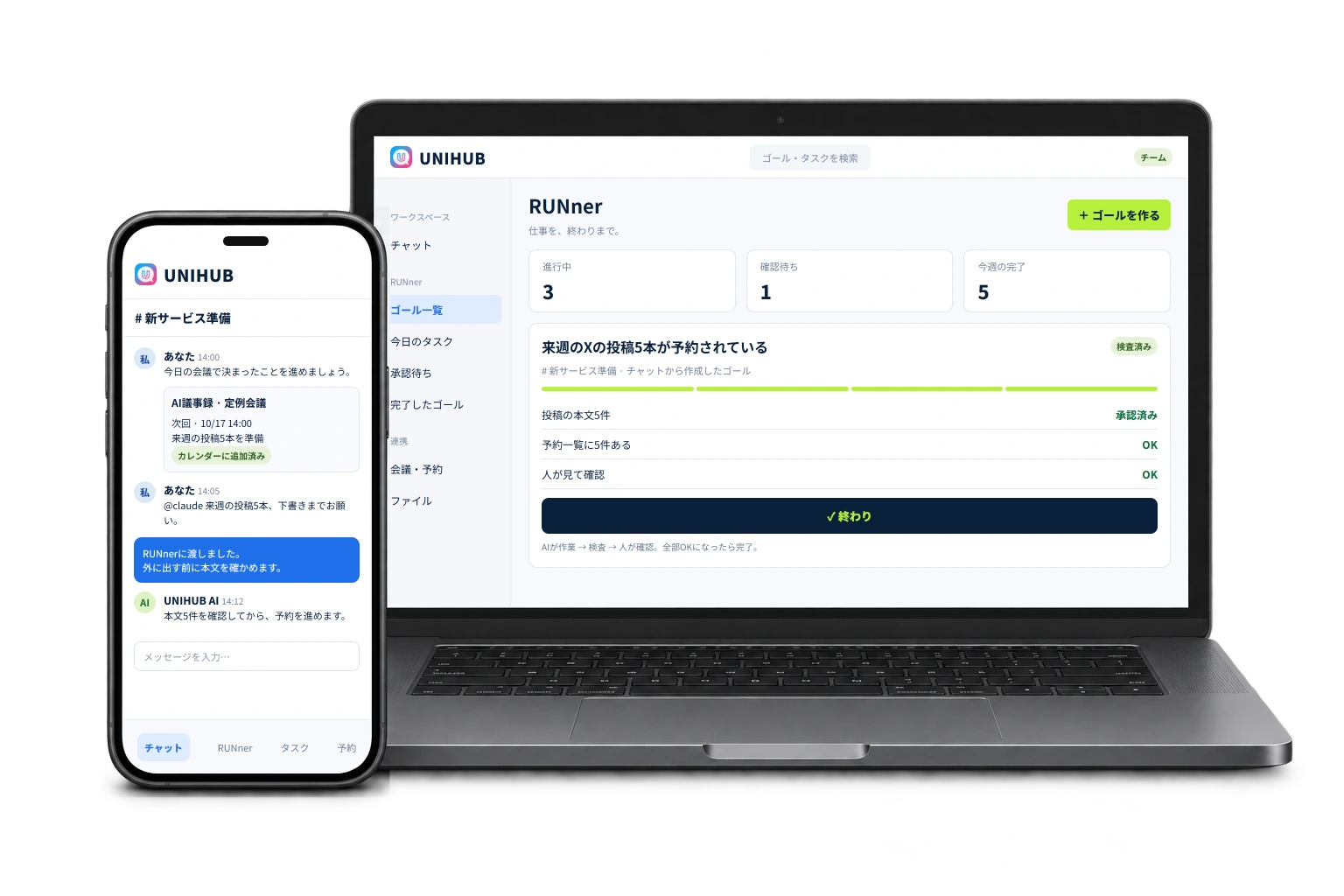
A PC showing the RUNner page, with a smartphone in front on the left showing the UNIHUB chat screen

Screens are for illustration

Work, people and data.
All in one unique hub.

Business chat used to be a place for keeping in touch.

UNIHUB brings together almost everything work needs: meetings, bookings, minutes, tasks, customer conversations and marketing. And AI finishes most of it.

The “UNI” in UNIHUB stands for UNIQUE. We care about both: unique features, and the uniqueness of the people who use them.

WorkPeopleData

Does your chat stall right after “it's decided”?

  • Decided in the meeting, and nobody has moved by next week

    The minutes exist. The to-dos are written down. But who starts on them, and when, is still undecided.

  • “I'll get back to you” keeps piling up

    Before you know it, there are 10 conversations you read but never answered. Just deciding which to answer first is tiring.

  • Scheduling with outside people, sending links, sending minutes

    Send your open dates, create a meeting link, tidy up and send the minutes afterwards. The same manual work, every time.

  • You ask AI, then still go check whether it's done

    Even when it says “Done,” you end up checking with your own eyes whether it was really published, or really booked.

  • You can't tell how far delegated work has gotten

    Until you ask “How's that going?”, you can't see the progress or how long it took.

Why doesn't work get finished in chat?

Chat is good at being a place to talk and decide.
But after the decision, “doing it” and “checking it's done” always stayed in human hands.
UNIHUB brings those into the chat too.

What's decided ends up written in the minutes, and that's it.

→

To-dos and the next meeting date go from the minutes into tasks and your calendar automatically.

AI answers what you ask, and that's it.

→

RUNner's AI takes a goal, does the work, and confirms with checks that it's done.

With outside people: email, another tool, another meeting link.

→

When a booking comes in, a meeting link and a private chat for that customer are created automatically.

You can't hand things over because you worry the AI will send something on its own.

→

Before posting, emailing, publishing, anything involving money, or deleting, the AI stops and checks with you (you choose what it checks).

AI carries your decisions to the finish.

RUNner is the feature in UNIHUB that gets work finished. Set a goal and what “done” looks like, then hand it off: Claude Code (Anthropic's AI) or Codex (OpenAI's AI), running on your computer, does the work. Even when the AI says “I'm done,” it isn't done until the checks pass.

Diagram: from a goal, to work on the PC, to an approval stop, to checked deliverables
  1. Set a goal

    A title and a one-sentence definition of done. Example: “5 X posts for next week are scheduled.” You can also create goals from meeting minutes or chat tasks.

  2. Ask AI

    One button hands it to Claude Code or Codex on your computer. Keep the RUNner PC app running and work moves forward even when you ask from your phone, even while you sleep.

  3. Stop and ask

    When unsure, it asks you or a teammate. Before any action you chose to review (all of them at first), it shows exactly what it will send and waits for approval.

  4. Checks pass, it's done

    RUNner checks “the page contains this text,” or a person looks and clicks OK. It's “done” only when every check is OK.

Hand off a goal. Done when checks pass.Set a one-sentence definition of done → the AI on your PC does the work → approve before anything goes out → done when all checks pass
AI drafts your backlog of replies in one goOnly the messages you need to answer, in one list → drafts with one button → a person checks and sends

Even when the AI says “I'm done,” it isn't done unless the checks pass.
Before anything goes out, it shows you what it will send and checks with you (you choose what to review; at first, everything).

Hand off. Move forward. Stop. Confirm.
Everything it takes to finish, inside the chat.

Hand off

Goals and definition of done

Decide up front, in one sentence, what counts as done.

A task that says “Work harder on social media” never ends. Even the person who asked doesn't know where it ends.

What it doesGive a goal a title, a definition of done, and the shape of done (a page is published / a post or message went out / a document is ready / a number has been reached / I check it myself and OK it). When it's fuzzy, choose “Work it out together” and the AI asks questions while working out the criteria and sub-goals with you.

So“Done” is decided before you ask, so neither the AI nor people get lost about how far to go.

Goals are shared with members of the same organization. You can split them into sub-goals.

From minutes and tasks

What's decided in a meeting becomes a goal on the spot.

Nothing starts until someone copies the meeting's next actions into tasks.

What it doesHand the “next actions” from your Zoom meeting's AI minutes straight to RUNner with “+ Make it a goal.” You can also hand off chat tasks with “Ask RUNner.”

SoAI can start the moment something is decided. Nothing stalls for lack of someone to copy it over.

Creating goals from minutes requires a Pro RUNner license or higher (the organization's owner can use it too).

Goal breakdown

Split goals that are too big into pieces that can actually be finished.

“Launch a new service” is too big. A month goes by without deciding where to start.

What it doesThe AI asks for missing information one question at a time (deadline, available people and time, budget, what must not be done), works backward from done in stages, and splits the work into pieces one person can finish in 1–3 days. It then confirms, with an AI in a different role and automated checks, that finishing every sub-goal really achieves the parent. Then you adjust and create it.

SoInstead of a plausible-looking tree produced in one shot, you get a plan that fits your deadline and people, and actually moves.

Pro and up. The AI runs on Claude Code on your computer (not available when your computer isn't connected).

Templates and schedules

Recreate what worked, in one step, next time.

Weekly meeting prep, monthly invoices. You build the same goal from scratch every time.

What it doesSave a goal that worked as a template, along with its sub-goals and checks, and create it in one step next time. Set a daily, weekly or monthly schedule and goals are created automatically, and can go straight to the AI on your PC.

SoRecurring work starts without anyone having to remember it.

Templates require Pro and up; schedules (automatic creation) require Focus and up.

Move forward

RUNner PC app

Ask from your phone. It moves forward while you sleep.

Work you think of while you're out can't be handed off until you're back at your computer. And at night, work stops.

What it doesKeep a small program (the RUNner PC app) running on your computer. When you press “Run on PC,” it picks up the request within 30 seconds and hands it to Claude Code, unattended. You can also hand off up to 20 of today's tasks at once, from the top. To stop, press “Stop all.”

SoWork moves forward even when you're not at your screen.

The RUNner PC app requires Pro and up (Pro runs one job at a time; Focus and up runs on multiple computers at once). Handing off in bulk requires Focus and up. It stops when your computer sleeps. It sends RUNner only the computer's name, conversation numbers, status, and progress updates (names of tools used and the start of AI messages; on by default, and you can turn it off in Connect AI), never the AI's full output or your files (only when you turn on “AI uploads deliverables to Drive” for a goal does the AI upload that goal's deliverables to RUNner's Drive).

Today's tasks

Set “when to do it,” separate from the deadline.

A task list with only deadlines looks the same right up until things are due.

What it doesGive goals a planned date and place them on a monthly calendar. “Today's tasks” lists what's planned for today plus what's due today or overdue, and you can hand them to the AI on your PC from the top down.

SoWhen you open it in the morning, you see only what to finish today.

Handing off in order, in bulk, requires Focus and up (items with only a deadline need to be set to “Do today” first). Adding them to Google Calendar also requires Focus and up.

Unanswered chats

AI drafts your backlog of replies in one go.

The more unanswered conversations pile up, the less you want to open them, and the more they pile up.

What it doesLists only what you need to answer (DMs where the other person wrote last, and mentions addressed to you). Reply by hand right there, or press “✦ Draft all replies with AI” to have up to 50 drafts written at once. You can see the AI reading and writing on screen, and drafts appear row by row as they're ready.

SoYou don't get stuck on “which one first.” You just check and send.

AI writes the drafts; a person sends them (you can edit before sending). AI drafting requires Pro and up (with the RUNner PC app running). The list shows the last 7 days.

Stop and ask

Approvals

Before anything goes out, the AI stops and checks.

You want to hand work to AI, but it would be a problem if it emailed customers or posted on its own.

What it doesBefore posting to social media or sending LINE messages / sending email / publishing a page / anything that moves money / deleting data, the AI is instructed to stop, show exactly what it will send (body, recipients, amount), and not proceed until someone presses “Approve” or “Decline.” Approvals are kept on record. You can approve from your phone too.

SoEven as you hand over more, irreversible mistakes become less likely.

You choose what to review in the initial setup guide (at first, everything is set to “Review”). Approvals can be given by the person who made the request or an organization admin.

Ask a member

When the AI doesn't know something, it goes and asks someone on your team.

The AI stalls on “Where is this document?” and you end up going around asking.

What it doesThe AI picks a member of your organization and asks a question. The person asked can answer even without a license. Replies are treated as “data,” not as instructions to the AI.

SoThe right answer comes from the right person, without you acting as messenger.

Focus and up. Up to 5 times per request, with up to 3 replies pending at once.

Confirm

Completion checks

Not “I'm done,” but “checked, and it's OK.”

You trusted the AI's “Completed,” opened the page, and it wasn't published.

What it doesThere are two kinds of checks: “the page contains this text” (RUNner goes and looks) and “a person looks and clicks OK.” Results are one of three: OK, NG or Can't tell. When it can't go and look, the result is “Can't tell,” never OK. On NG, the AI retries up to 2 times; if it still fails, it comes back to you.

SoWhat's done is really done. No more double-checking.

If there are no checks, the AI adds them at the end. You can recheck anytime with “Check now.”

Check against UNIHUB's numbers

Checks can confirm results like “3 bookings came in.”

Whether “send the broadcast” or “get 10 people to the webinar” is done, you can only find out by opening the admin screen and counting.

What it doesChecks channel posts, broadcasts sent, bookings, webinar registrations, paid post purchases, member growth and zero unanswered messages against the numbers inside UNIHUB.

SoThe source of truth for the numbers is in the same place, so it doesn't end on self-reporting the way outside AI does.

All tiers. Only counts items in the same organization (only “0 unanswered” counts replies waiting on you across everything).

Achieved goals and analytics

Finished work, and the time it took, stay on record.

You want to look back at what you finished this month, but the records are scattered.

What it doesLists finished goals by month and shows how long each took from creation to completion. Large goals can be viewed in the “Goal list,” sorted by category. Focus and up gets analytics showing the number and speed of goals, requests and approvals by week.

SoNo more making reports to explain what moved forward.

Analytics require Focus and up; per-member usage reports (CSV) require Unlimited.

As a team

Team

Progress on delegated work comes to you on its own.

Going around asking “How's that going?” has become the manager's job.

What it doesChoose the members you want to see and show them as cards, then assign goals from there. Started, asked AI, checks OK, finished: updates flow in newest first, and the time from assignment to completion is shown per person. Members without RUNner still get goals in chat and can reply with “Started,” “Reported done” or “Ask.”

SoWithout asking, you know who has moved what, and how far.

Assigning requires Focus and up. Receiving needs no license. Your organization chooses who can view it (everyone / admins only).

Notifications

When it stalls, your phone knows.

The AI had stopped with a question, and nobody noticed for half a day.

What it doesAI questions, approval requests, questions to members and finished goals arrive at UNIHUB's bell and on your phone. An hourly sweep also alerts you to requests with no report for 2 hours or more, and requests not started for 24 hours.

SoLess time spent stalled.

Notifications to Slack and Google Calendar (goal deadlines) require Focus and up.

Library

Hand a process that worked to someone else, and AI handles the back-and-forth.

You explain the same process to new people again and again. And you answer every question that follows, every time.

What it doesTurn the steps, tips and pitfalls from a finished goal into a template and store it in folders. Pick someone to send it to, and the steps arrive by DM. Your Claude Code answers their questions based on those steps (if the steps don't cover it, the question comes back to you).

So“Teaching” and “answering” come off your plate.

Sending to others requires Focus and up. You can only send to members of the same organization. AI replies are limited to 30 per day per item.

Bookings, meetings and minutes with outside people, all finished in the chat.

Set the date, send the meeting link, hold the meeting, send the minutes, decide what's next. We put that whole flow with outside people into one room.

A businessman in a calm meeting room, conducting a business meeting with a PC and a notebook
  1. 01
    Booking

    Publish your open slots and customers pick a date and time and book themselves.

  2. 02
    Link and room

    The moment a booking comes in, a meeting link and a private chat for that customer are ready.

  3. 03
    Meeting

    Start a Zoom meeting from inside the room. Recording and AI minutes are announced in advance.

  4. 04
    Minutes

    You check and edit the AI minutes before sharing them.

  5. 05
    Next step

    The next meeting date and to-dos go into tasks and your calendar.

A meeting link and invitation, the moment a booking comes inThe customer picks a date and time → the meeting link and calendar invitation arrive → a private room for that customer is created too
After the meeting, next steps get movingNext meeting date and to-dos in the AI minutes → tasks for each owner → hand to AI with “+ Make it a goal”

An exchange that starts with “How about Tuesday or Thursday afternoon next week?” takes three rounds for a single meeting.

Booking calendar

Back-and-forth scheduling emails become a single link.

What it doesSet the days, time slots and slot length, then publish a booking page, and customers pick a date and time and book themselves. Confirmation emails and reminders 24 hours and 1 hour before go out automatically.

SoNo more back-and-forth just to set a date.

Starter plan and up. To change the date or time, cancel and book again. There is no feature that reads the host's regular calendar to block out busy slots.

Every time a booking comes in, you open Zoom, create a meeting, copy the link and paste it into an email.

Automatic meeting links

The moment a booking comes in, the meeting link has already arrived.

What it doesOn the booking page, choose “Auto-create Zoom for each booking” or “Auto-create Google Meet for each booking.” The moment a booking comes in, the meeting is created and the meeting link and calendar invitation go to the customer and the host (with Google Calendar connected, the invitation comes from Google; without it, an invitation file for Google, Outlook or Apple calendars is attached to the email). Cancel, and the meeting and event are removed too.

SoNo more manually creating and sending links for every booking.

Zoom requires the Zoom integration; Meet requires the Google Calendar integration. Microsoft Teams is not supported. If Zoom fails to create a meeting, the booking stays confirmed and it retries every 5 minutes (up to 5 attempts, including the one at booking time).

Customer contact by email, meetings in another tool, documents somewhere else again. Later, you can't trace what happened.

Customer chat (external chats)

Outside people join the same room, no account needed.

What it doesCreate rooms that only people with the invite link can join, just by entering a name. When a booking comes in, a private room for that customer is created automatically, and booking details, the meeting link and cancellations are posted there. You can start a Zoom meeting from inside the room, and rooms don't appear in search or public listings.

SoConversations before and after the meeting, and the minutes, stay in one place.

Rooms you can have at once: Starter 3, Pro 10, Business 30 (rooms created automatically from bookings don't count). “Close” a room to free up a slot.

AI minutes are handy, but it would be a problem if internal talk reached the other side.

AI minutes (review before sharing)

Minutes go out only after you've edited them.

What it doesAI creates minutes from your Zoom recording. Minutes from rooms with outside people are never shared automatically. When you review, edit and press “Share,” only the edited version is sent via a share link. Share links are listed, and one “Delete” button makes a link stop working. You can also save as PDF or Markdown.

SoEven when AI writes the minutes, you decide the words that go out.

Transcription requires a paid Zoom plan with cloud recording and audio transcription turned on. Whether to record booked meetings can be set per booking page (off by default).

At the end of the meeting someone says “So by next time…,” and nobody remembers what.

Next meeting and to-dos

When the minutes are ready, the next steps are already moving.

What it doesAI minutes include the “next meeting date” and who owns each to-do (host / guest). The host's to-dos go into your tasks; the guest's go into the room's “Tasks” section, and you're notified when they mark one complete. If Google Calendar is connected, the next meeting date is added automatically to a calendar dedicated to UNIHUB.

SoNo more “summarize, send, and remind” after every meeting.

Created once per meeting. Anything you don't need can be undone in bulk. UNIHUB only touches the “UNIHUB” calendar in your Google Calendar and doesn't read your other events.

Everyday chat, built so switching over is painless.

In place of Chatwork, Slack or Teams. A business chat with one flat price per organization that doesn't grow with headcount.

  • Group chats, DMs and threads

    You can also create secret threads that only people you choose can see.

  • Mentions, reactions and pins

    Bookmarks and forwarding too.

  • Scheduled send and reminders

    Choose a date and time to send. Get reminded again yourself, say “tomorrow at 9 a.m.”

  • Turn into tasks

    Turn a message straight into a task, with an owner, deadline and reminder.

  • Search everything

    Search messages, people, groups and meeting minutes together (Ctrl+K).

  • Chat summary page

    Decisions, progress, minutes and files on one page for each chat.

  • Dates in chat → calendar

    When someone writes “tomorrow at 3 p.m.,” add it to your calendar on the spot.

  • File attachments

    Up to 100 MB per file.

  • Mobile apps

    Apps for iPhone and Android, plus a browser version.

  • Move from another chat

    Import history from Slack-format ZIP or CSV files (admins).

AI is in the conversation from the start.

@claude, @chatgpt, @gemini

Just mention them for summaries, translations and reply suggestions, without breaking the flow of the conversation.

AI auto-reply that knows when to stay quiet

The AI replies only to questions backed by documents you've registered, and stays silent otherwise (paid plans).

Shared agents

Team AIs with memory that you can call with @.

Collaborative documents

Write together while asking AI to “format this as meeting minutes.”

MCP

Operate UNIHUB from outside AIs such as Claude Desktop and ChatGPT.

For 7 days from sign-up, you can use AI without an API key. After that, it stays free if you add your own OpenAI, Claude or Gemini key, and on the Starter plan and up, the owner can use AI without a key.

Attract, nurture and sell. In the chat, too.

The Starter plan and up gives you a full set of marketing tools (paid channels work even without a plan subscription). The conversations they start continue right in the chat.

01Attract

Automated webinars
Run YouTube videos at set times, as many times as you like. Free for viewers, unlimited attendees (up to 5 published at once).
Lead magnets
A page that collects contact details in exchange for a resource.
Giveaways
Just send a code and the gift is delivered automatically.

02Nurture

Broadcasts (DM)
Send a DM to everyone in your community at once.
Step sequences (DM)
Scenarios of up to 10 steps sent automatically, like “X days and Y hours after sign-up.”
SOCIALVIEW
Connect UNIREACH and UNIECHO to see social posts and comments on one screen (X via UNIPOST is in testing with some organizations). Comments left unanswered for 24 hours or more are flagged every morning.

03Sell

Paid channels
Connect your own Stripe account to sell group chats and open chats as monthly subscriptions (fees: UNIHUB 3% + Stripe approx. 3.6%).
Paid posts
Sell a single post as a one-time purchase. No Stripe connection needed (12% fee, payment processing included).
Marketing dashboard
Broadcast, webinar and booking numbers on one screen.

Email newsletters can be sent with UNISTEP (UNIHUB's email delivery ended on September 1, 2026).

Intro video of the marketing features (about 52 seconds). It plays without sound when it scrolls into view (turn on sound from the player bar). Screens are for illustration.

What you should know before handing work to AI.

We don't hold your card details

All payments are processed by Stripe. Card numbers never reach our servers.

The database checks the owner of every row

We don't rely on app code alone; who can see what is also restricted on the database side.

The AI sees what you see, nothing more

RUNner's AI can only see goals in organizations you can see. Replies from members are not treated as instructions.

Reviewed by two different AI systems before release

Issues found are fixed at the root cause. We do not hold third-party certifications (SOC 2 / ISO 27001).

One flat price per organization. It doesn't grow with headcount.

Free

For individuals

¥0/mo

  • Unlimited members
  • 1 GB storage, 45-day history
  • Free local AI + your own API key
  • Core chat features

Starter

For individuals

¥1,480/mo

Annual: ¥15,984

  • Unlimited members, 50 GB, unlimited history
  • Owner uses AI without a key
  • Marketing features (booking, broadcasts, webinars and more)
  • RUNner: up to 20 runs/month for the owner

Pro (our pick)

For organizations and communities

¥14,800/mo

Annual: ¥159,840

  • Unlimited members, 200 GB
  • 10 AI seats without a key
  • 10 external chat rooms
  • RUNner: unlimited runs for the owner

Business

For organizations and communities

¥49,800/mo

Annual: ¥537,840

  • Unlimited members, 1 TB
  • 50 AI seats without a key
  • RUNner: unlimited runs for the owner

All prices include tax and are monthly, per organization. Billed in Japanese yen (JPY). The price is the same no matter how many people use it. Annual billing is 10% off 12 months. Enterprise is quoted individually. Sign-up, changes and cancellation are handled by the organization's owner.

RUNner license (per person; available on its own)

Even if your UNIHUB plan stays on Free, a per-person RUNner license lets you use RUNner. Start with a 7-day free trial (no card required, same features as Pro, once per person; it stops automatically after 7 days and you are not charged). In organizations on a paid plan, the owner uses RUNner through the plan and everyone else through a license (license holders get unlimited runs).

TierMonthlyAnnualWhat you get
Starter¥680/moMonthly onlyConnect your own AI, goals, completion checks, approvals
Pro¥2,580/mo¥25,800/yr+ RUNner PC app (one job at a time), templates, goals from minutes
Focus¥5,280/mo¥52,800/yr+ RUNner PC app on multiple computers, schedules, bulk hand-off, ask members, analytics, notifications to Slack / Google Calendar
Unlimited¥9,380/mo¥93,800/yr+ Per-member usage reports

Per person, tax included. On Pro and up, we discount ¥1,500/month (¥15,000 for annual billing) for each person who has an AI seat. You pay when you sign up, and it renews automatically every month (every year for annual billing). Adding people mid-term is billed pro rata until the next renewal date. You can remove people or cancel anytime, and billing stops from the next renewal date (no pro-rated refunds). AI usage fees are charged separately under your own Claude subscription (paid plan or API key). ZUBOLAND does not charge for AI usage.

You can cancel anytime from the app. After cancelling, you can keep using it until the end of the paid period. There are no pro-rated refunds. For details, see our Specified Commercial Transactions Act disclosure. Specified Commercial Transactions Act disclosure (Japanese)

Get started in 3 steps.

STEP01
Sign up.

Sign up with email, Google, Apple or GitHub. No card required.

STEP02
Invite your team.

Just send an invite link. The price is the same no matter how many people you invite. You can bring your history over from Slack-format ZIP or CSV files too.

STEP03
Hand a goal to RUNner.

The screen walks you step by step through connecting Claude on your computer (about 15–30 minutes). Then set a goal and press “Ask AI.”

Is it right for you?
Ask the AI you already use

Press a button and the question goes straight into the AI. UNIHUB publishes its pricing and what each plan can't do as public data (Japanese), so the AI reads that to answer.
The question tells it to say “not a fit” when it isn't.

See or copy the question we send to the AI
I want to decide whether UNIHUB (an AI business chat from ZUBOLAND Co., Ltd., which also has features for running communities and selling courses) is a good fit for us.
After reading the URLs below, tell me clearly whether it is “a good fit / not a good fit” for my situation. If it isn't a fit, say so.

How to answer:
- Separate the cost into “chat cost” and “AI cost,” and compare them with what I pay now
- For the plan, consider the cheapest plan (including the free plan) that has the features I want
- For anything you can't confirm from public information, write “can't confirm” instead of guessing
- The pages below are in Japanese; please answer in English

- https://hub.uni-core.jp/en
- https://hub.uni-core.jp/llms-full.txt
- https://hub.uni-core.jp/llms.txt

My situation: (write the number of people, the chat, membership site and messaging tools you use now and the monthly cost of each, whether you run a community or sell courses, and how you want to use AI)

* Answers come from the AI and their content is not guaranteed. The authoritative source for pricing and terms is this page and our Specified Commercial Transactions Act disclosure (Japanese).
* Pressing a button also copies the question to your clipboard. If it doesn't fill in automatically, paste it into the AI.

FAQ

QWhat do I need to use RUNner?
A

A computer running Windows 10 (1809 or later) or 11, or macOS 13 or later. For Claude Code, a paid Claude plan (Pro, Max, Team or Enterprise) or an Anthropic API key; for Codex, a paid ChatGPT plan or an OpenAI API key. The AI doesn't run on phones, but you can reply and approve from your phone.

QDo AI usage fees cost extra?
A

RUNner's AI runs on your own Claude subscription (or API key). ZUBOLAND does not charge for AI usage.

QWill the AI post or send email on its own?
A

Before any action you chose to review (at first, everything: posts, broadcasts, email, publishing, money and deletion), the AI is instructed to stop, show exactly what it will send, and wait for your approval. Approvals are kept on record.

QWill the AI send replies to unanswered chats on its own?
A

The AI only writes drafts. Messages are sent only when you check them and press “Send.”

QWho can use RUNner?
A

The owner of an organization on the Starter plan or higher (up to 20 runs/month on Starter, unlimited on Pro and up). Other members can use it with a per-person RUNner license (from ¥680/month). Just answering the AI's questions doesn't need a license.

QDo outside people need to create an account?
A

No. Anyone can join an external chat just by opening the invite link and entering a name.

QWill AI minutes reach the other side on their own?
A

Minutes from rooms with outside people are never shared automatically. The edited version is sent only when you review, edit and press “Share.” You can revoke a share link later with one button.

QCan I hold meetings on Teams?
A

Automatic meeting links for bookings support Zoom and Google Meet. Microsoft Teams is not supported.

QDoes the price go up as more people join?
A

No. Every plan is a flat price per organization with unlimited members (only the RUNner license is per person).

QCan we move over from Slack or Chatwork?
A

Use “Move from another chat tool” in settings to import history from Slack-format ZIP or CSV files (organization admins only).


Line drawing of a team that has finished its work, in front of reviewed documents and a closed laptop
No credit card, unlimited members

Don't stop at talking.
Switch to the chat that gets work done.

What you decide is carried through to the end by AI, all the way to confirming it's done.
Start free and bring your team's chat to UNIHUB.