How to sell monthly memberships
How this is used in practiceCh. 2 Marketing (the whole flow)
Screenshots show the Japanese screens; the English screens have the same layout.
Sell group chats and open chats as monthly subscriptions. Sales are paid directly into your own Stripe account.
What is monetization?
Sell your community as a monthly subscription
Connect your Stripe account and you can sell private groups (channels) and open chats as monthly subscriptions. Use it for online salons, paid communities, support groups for courses, and more.
Sales are paid directly into your Stripe account
You, the seller, are the party responsible for payments, payouts, and refunds. Money goes directly into your Stripe account without passing through UNIHUB (check your payout schedule and statements in the Stripe dashboard).
The effective fee is 6.6% (including payment processing)
UNIHUB's platform fee of 3% plus Stripe's payment processing fee (about 3.6%) comes to roughly 6.6% in total. On a ¥1,000 (JPY) monthly price, about ¥934 stays with you. The fee rate in effect when a member subscribes applies to that subscription.
Cancellations and missed payments remove members automatically
When a member cancels or their payment stops, they are removed from the group automatically. You don't have to manage the problem of people staying without paying.
Getting started (connect Stripe)
Connect (organization owner only)
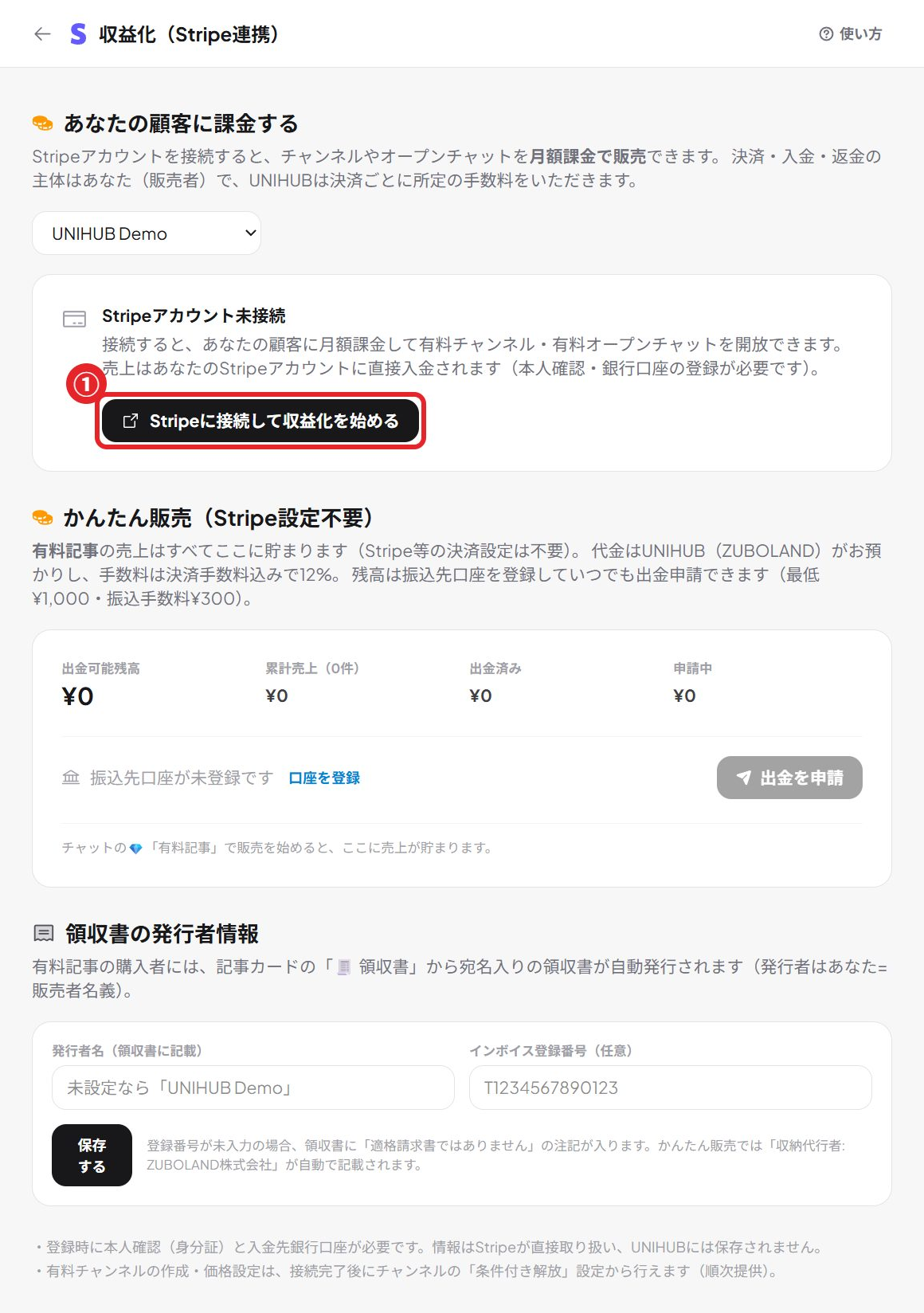
Go to Settings → Integrations & automation → "Monetization (Stripe)" → "Connect Stripe and start earning". Stripe's registration form opens; follow the instructions and fill it in. All monetization settings can only be changed by the organization owner.
Identity verification and bank account
As a seller you need to verify your identity (ID document) and register the bank account for payouts. Stripe handles this information directly; it is not stored in UNIHUB.
You can start selling once the review is done
After you finish entering your details, you automatically become "ready to accept payments" once Stripe finishes its review (usually a few minutes to a few days). If you leave partway through, you can pick up where you left off at any time with "Resume".
Paid channels (groups)
How to set one up (just enter a price)
In the private group's "Group chat settings" → "Unlock rules" tab, choose "Paid members (monthly)", enter a price (¥100–¥1,000,000), and save. Members see the group with a 🔒 icon and can subscribe from the 💳 button.
The member's experience
💳 button → pay on Stripe's secure checkout page → the group is unlocked automatically. Right after paying, members can confirm it has gone through with the "Check payment" button (usually a few seconds to 1 minute).
Changing the price or deleting the rule
When you change the price, the new price applies to new subscriptions (existing members keep paying the amount from when they signed up). Deleting the rule does not stop billing for existing members.
Monthly open chats
How to set one up
In the open chat, click "🛡 Manage" in the top right → "💳 Monthly fee (make joining paid)" and enter a price. From then on, new participants can enter after paying (people who have already joined stay as they are).
Participants don't need an account
Open the join URL (/o/xxx), choose a nickname, pay through Stripe, and you're in. No UNIHUB account is needed, so you can run a paid salon with the same low barrier as a LINE open chat (LINE is Japan's most widely used messaging app).
Switching phones is fine (restore your membership)
If you change devices or clear your browser data and can no longer get in, you can restore access from "Already purchased?" on the join page. Enter the 6-digit confirmation code sent to the email address you used when paying, and your membership moves to the new device.
Sales pages (shareable links)
One sales page per product
Go to Settings → Monetization → "Sales pages" to create a shareable sales page (/offer/xxx) for each monthly product (paid channel or monthly open chat). You can freely edit the title, description, and the list of perks (shown with ✓).
Sell directly to people outside your space
Just paste the URL into social media, LINE, or your newsletter. For open chats, people can buy and join without an account. For channels, buying with a free UNIHUB account automatically adds the buyer to your space and unlocks the group.
Prices update automatically; stop with one click
A sales page always shows the product's current price. If you remove the monthly fee from the product, the sales page automatically stops selling too. You can take it private at any time with "Unpublish".
Attract members with automated webinars (Starter and above)
Go to "Business" → "Automated webinars" to stream a recorded video as a live-style session and automatically invite only the people who finish it to an exclusive channel. Make that channel a monthly product and you have a complete funnel: free webinar → a paid community of only your most engaged people. All webinar features (including the planning AI, follow-up emails, AI follow-up, and finisher invites) are available on the Starter plan and above. For details, see the help page "How to use automated webinars".
Checking your sales
Revenue dashboard
Under "Revenue (paid memberships)" in Settings → Monetization, you can see the number of active members, projected monthly revenue, projected take-home (estimate), new and canceled subscriptions in the last 30 days, a breakdown by product, and recent activity.
Payouts and refunds are handled in the Stripe dashboard
Actual payout amounts, payout dates, and refunds are handled in your Stripe dashboard (dashboard.stripe.com). The numbers in UNIHUB are estimates based on the monthly price at the time each member subscribed.
FAQ
What if a member wants to cancel?
Contact the seller (admin) of the group or community you belong to. The seller can cancel immediately or at the end of the billing period from "Subscriptions" in the Stripe dashboard. Once canceled, the member is removed automatically.
Can I issue refunds?
Refund decisions and processing are up to the seller (refunds can be issued from the Stripe dashboard). As the party selling the product, we recommend that sellers display the disclosures required by Japan's Act on Specified Commercial Transactions and a clear refund policy.
What plan does the seller need?
Monetization (Stripe connection, paid channels, monthly open chats, and sales pages) is available without any additional plan. The only cost is the fee on sales (effectively about 6.6%).
Who can set this up?
Connecting Stripe, setting prices, and managing sales pages can all be done only by the organization owner (because these are tied directly to revenue and identity verification, they are not open to admins either).